Best Trip Planning Apps in 2026: 20 Apps Compared and Priced
Key Highlights
- 1
- 2
- 3
+3 more in the takeaways below
Most trip planning apps in 2026 are excellent at one job and absent from the rest. Wanderlog builds a beautiful map. TripIt files your confirmation emails. Splitwise settles the bill. TripProf is the best trip planning app for group trips: one app for the plan, the bookings and the bill, and one $3.99 credit unlocks the trip for everyone on it. The group votes on the Trip board, and every booking you forward to the trip's inbox lands one tap from the right day. Planning, the Trip board and the core guide are free to start, with no card. If all you want is a free map to drag places onto, Wanderlog's is the best.
The bill is where group trips go wrong. A CIT Bank survey run by Harris Poll found that 45% of US group travelers have had some form of financial conflict or discomfort on a trip.
- Best for group trips: TripProf. One credit unlocks the trip for everyone, with polls on the Trip board and a booking inbox per trip.
- Best for a first trip abroad: TripProf, whose free guide covers emergency contacts, embassies, safety and cash vs card for every destination.
- Best free map-first planner: Wanderlog, for its map canvas and generous free tier.
- Also great: TripIt Pro plus Flighty for frequent flyers, Tricount for free bill splitting, Polarsteps for a travel journal.
- Full disclosure: TripProf publishes this blog. We checked all 20 apps against the same eight features, using each app's own pages as of October 2026, and listed where TripProf falls short.
Planning a group trip? Start it free in TripProf, invite one person, and ask your first question on the Trip board.
What to actually look for in a trip planning app
Before comparing 20 apps, you need a yardstick. Most "best apps" lists throw names at you without saying what matters. These are the eight features that separate a trip planner from a to-do list:
- Itinerary builder: day-by-day planning you can reorder, not a pile of bookmarks
- Expense tracking: multiple currencies, splitting between travelers, and a clear "who owes whom"
- Destination guides: transport, safety, money and culture, not just restaurant reviews
- Packing checklists: lists that adapt to where you're going and what you're doing
- Document storage: tickets, hotel confirmations and insurance in one place
- Collaboration: editing together, plus a way to actually decide things as a group
- Offline access: because your data plan won't work in a Slovenian national park
- Maps: your stops on a map, with the route between them
Most apps cover two or three. A few cover five or more. And the gap gets wider the moment a second person joins the trip.
The first figure is ours: 58% of trips are planned with a partner, family, friends or a larger group, against 42% solo. TripProf data, 1,345 trips planned in TripProf, as of 2026-10-17. Percentages are of trips planned in TripProf, not of travellers generally. The download count comes from Sensor Tower's 2025 travel report.
So the question isn't only "which app plans best". It's which app the rest of your group will actually open.
All-in-one trip planning apps: the ones trying to do everything
All-in-one planners put the itinerary, expenses, collaboration and at least some destination content in one place. They're the closest thing to replacing a four-app stack. We rank them by how much of the eight-feature yardstick they fill, then by how well they hold up once a group is involved.
TripProf
TripProf covers all eight features in one app, and it's the only one here that pairs them with destination guides written for your trip, group polls, and a price per trip instead of per person. Two trip organizers built it in 2025 after one too many trips run across a planner, a splitting app, a packing app and a shared doc nobody updated.
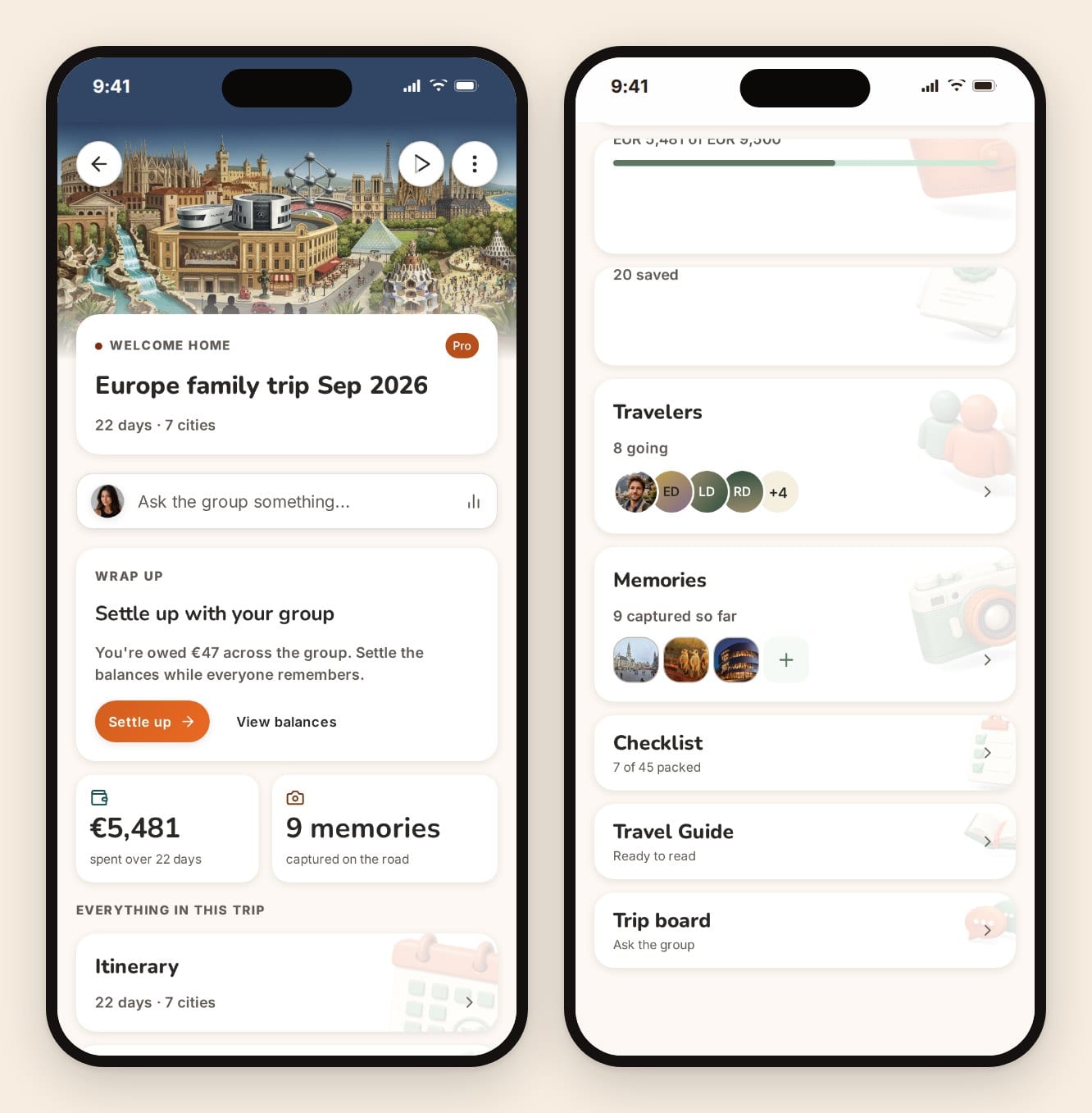
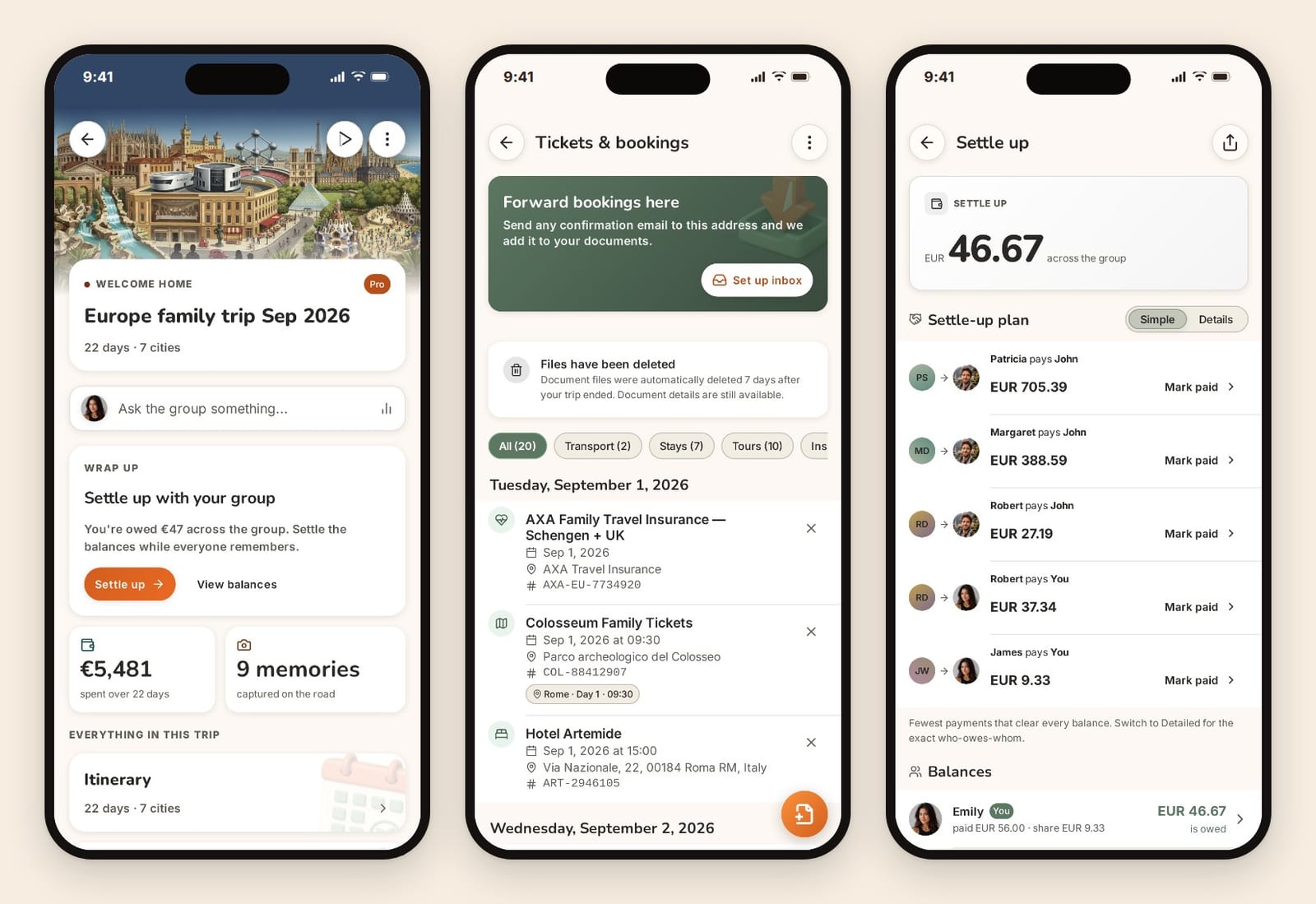
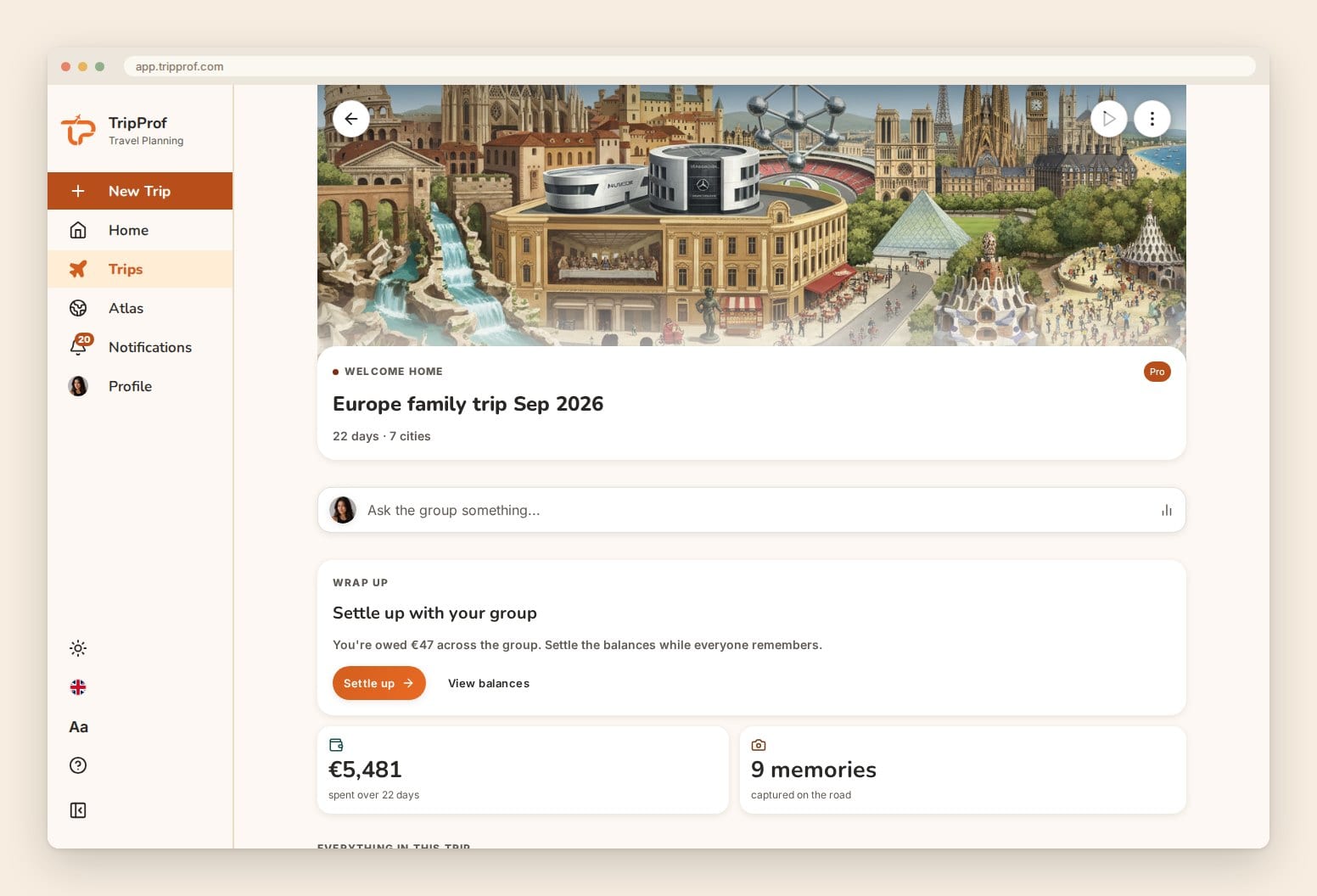
The trip dashboard is where the group starts. It shows the trip, the one thing worth doing next (here, settling up after the trip), the total spend, the photos, and every section of the trip in one list. At the top sits "Ask the group something", which opens the Trip board.
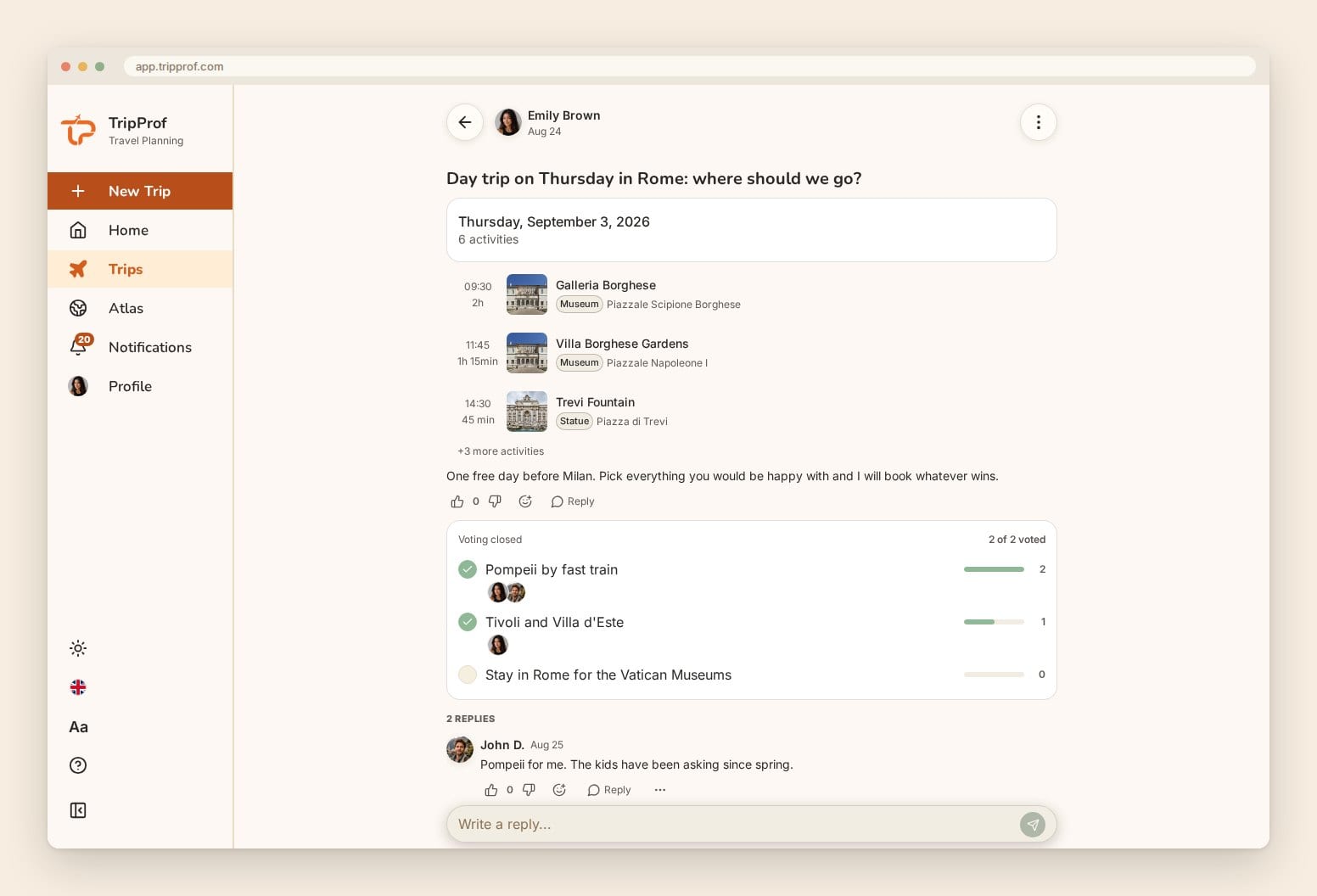
The Trip board is how a group decides things. It's a discussion space inside the trip: posts, replies, @mentions, search, and polls. "Thursday or Friday for the boat tour?" becomes a poll with a visible tally, instead of 40 messages in a group chat. It launched in September 2026, and it's free for everyone on the trip, including invitees.
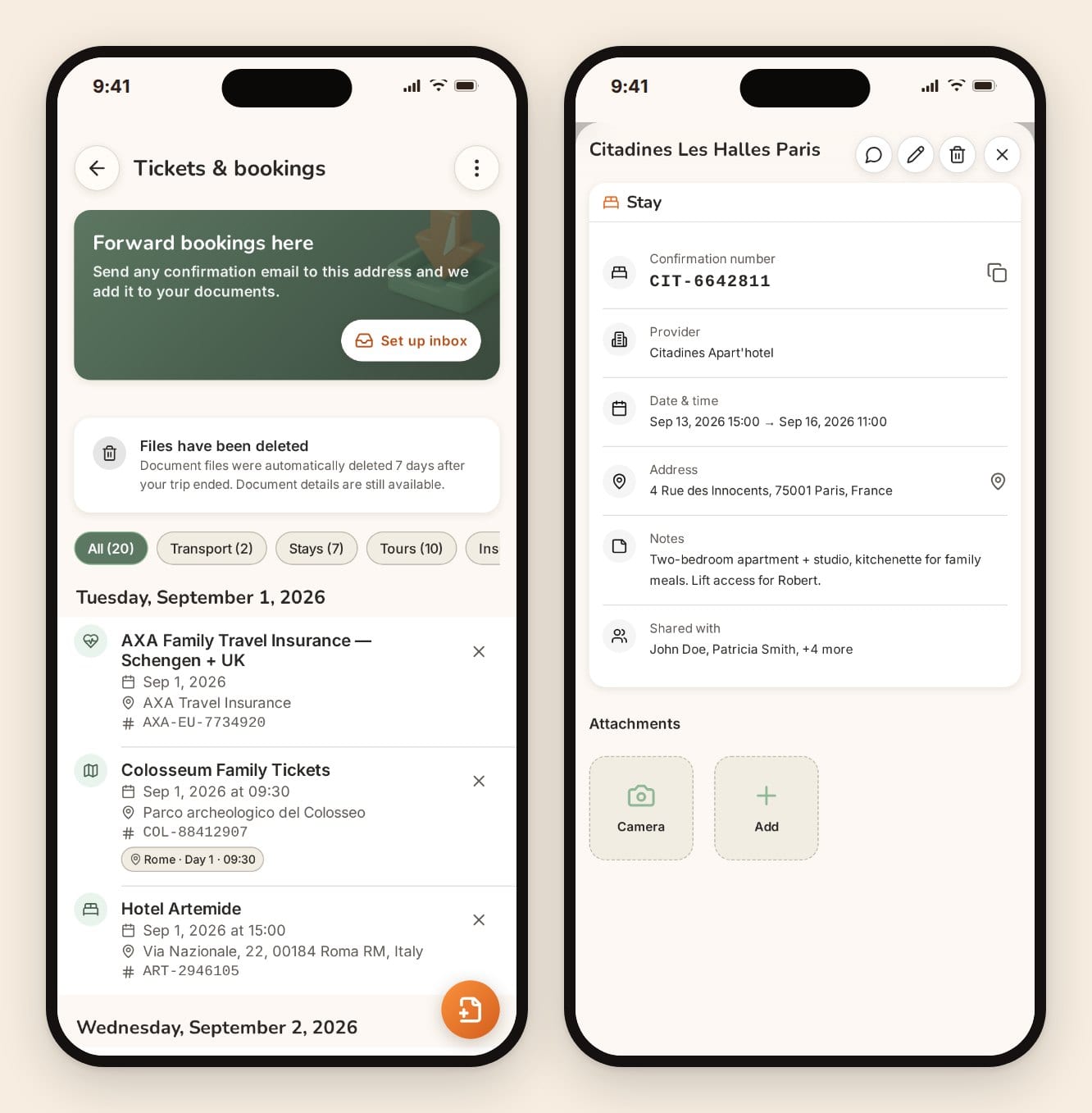
The trip inbox gives every Pro trip (one the organizer has spent a credit on) its own email address. Forward a confirmation and it's read and filed under Tickets & bookings. It recognises nine kinds of booking: flights, trains, buses and ferries, hotels, car rental, tours, events, restaurants and insurance. Since November 2026, flights, trains, buses and ferries, tours, events and restaurant bookings go straight onto the right day. Hotels and car rentals wait for one tap on "Add to itinerary", and so does anything that looks like a duplicate or falls outside the trip dates. "Log expense" opens the expense already filled in with the amount, currency and date, and you confirm it, which we'd argue is the right call for the group's money.
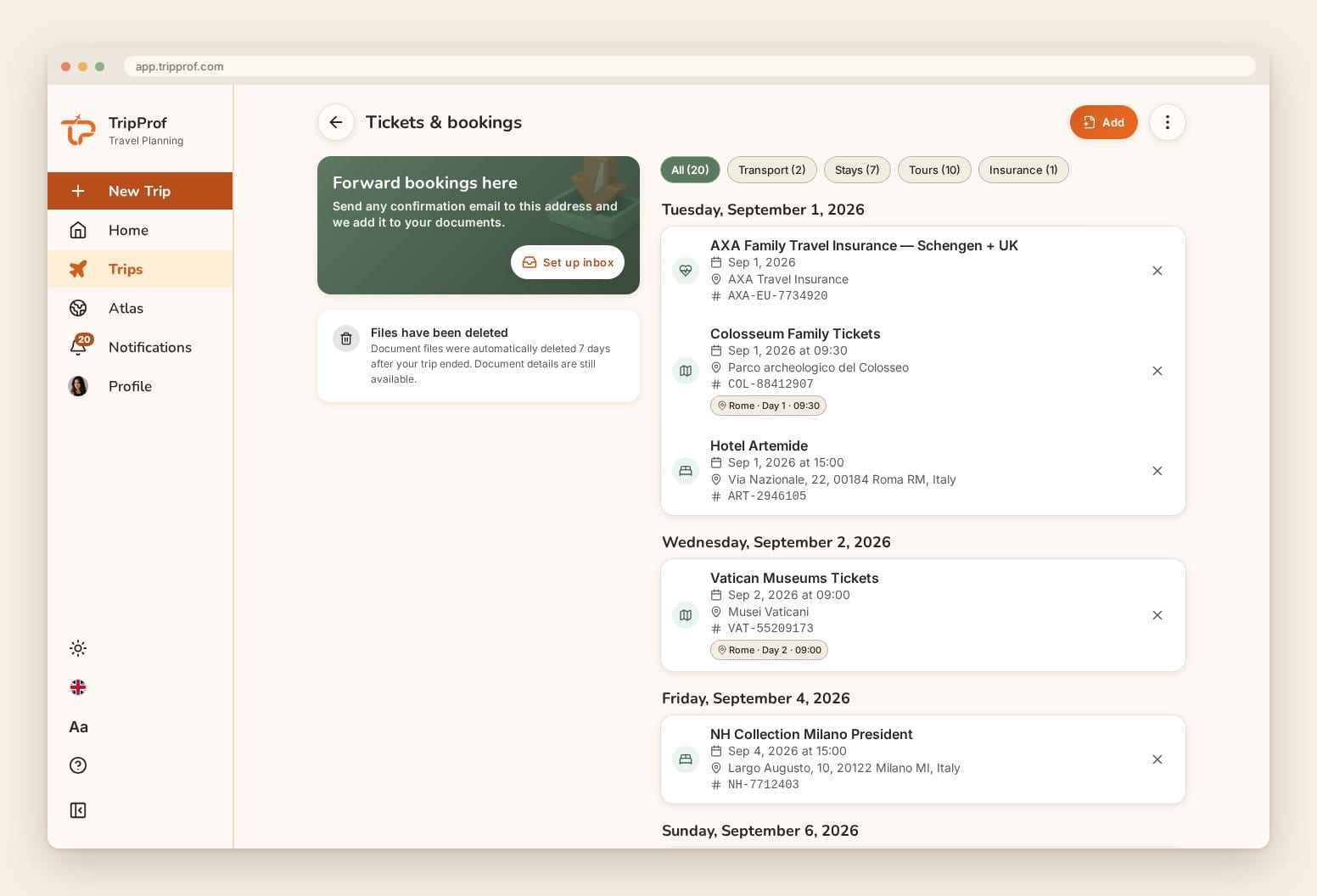
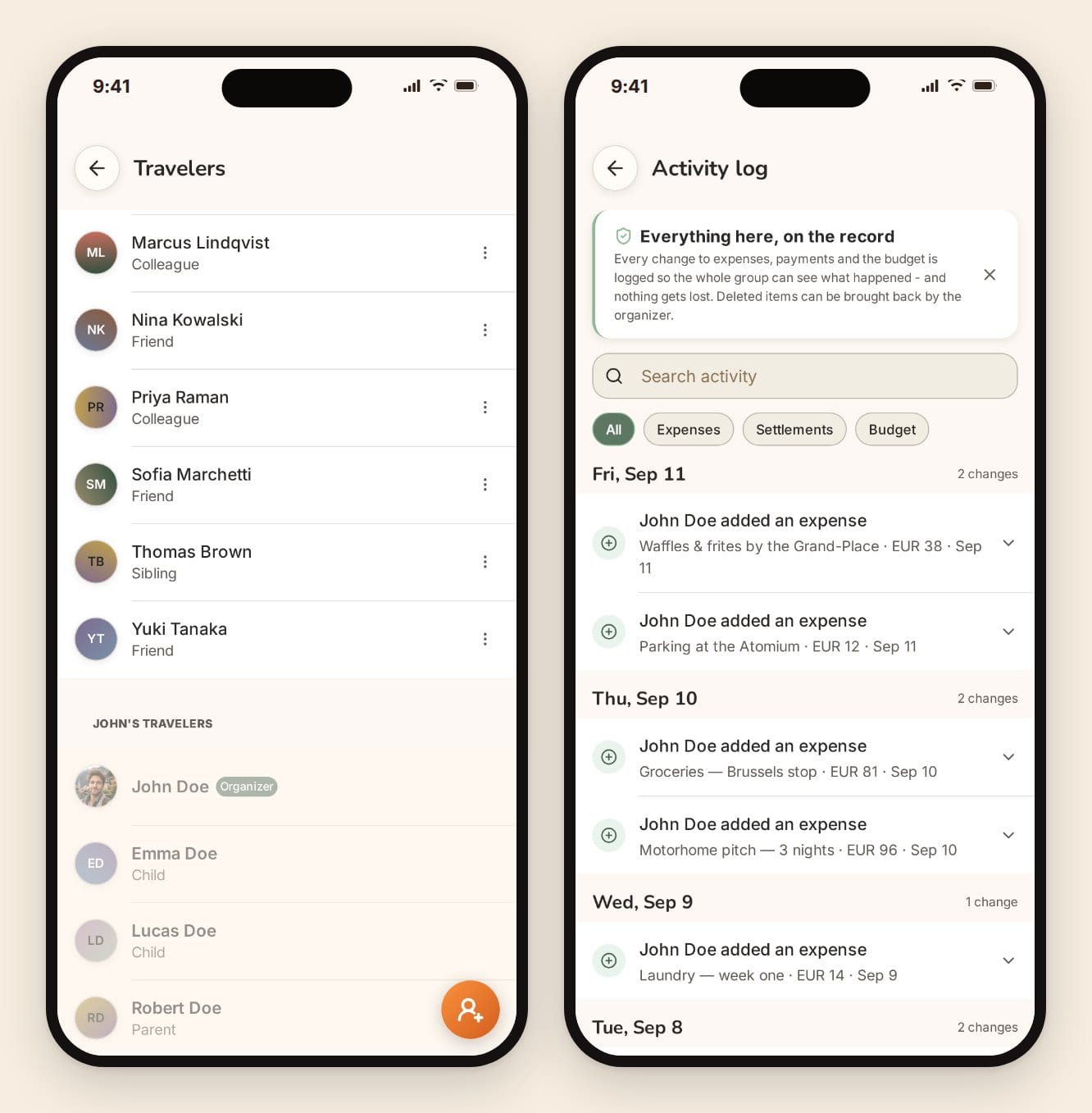
Collaboration has real roles. The organizer invites people by email as editors or viewers, or with a share link that joins people as viewers. An activity log records every expense, payment and budget change, and who made it. And here's the pricing detail most comparisons miss: one credit on the trip unlocks it for every member. No per-seat fees, and nobody else needs a subscription. Several paid apps below, including Layla, Polarsteps Plus and Notion, are sold per account.
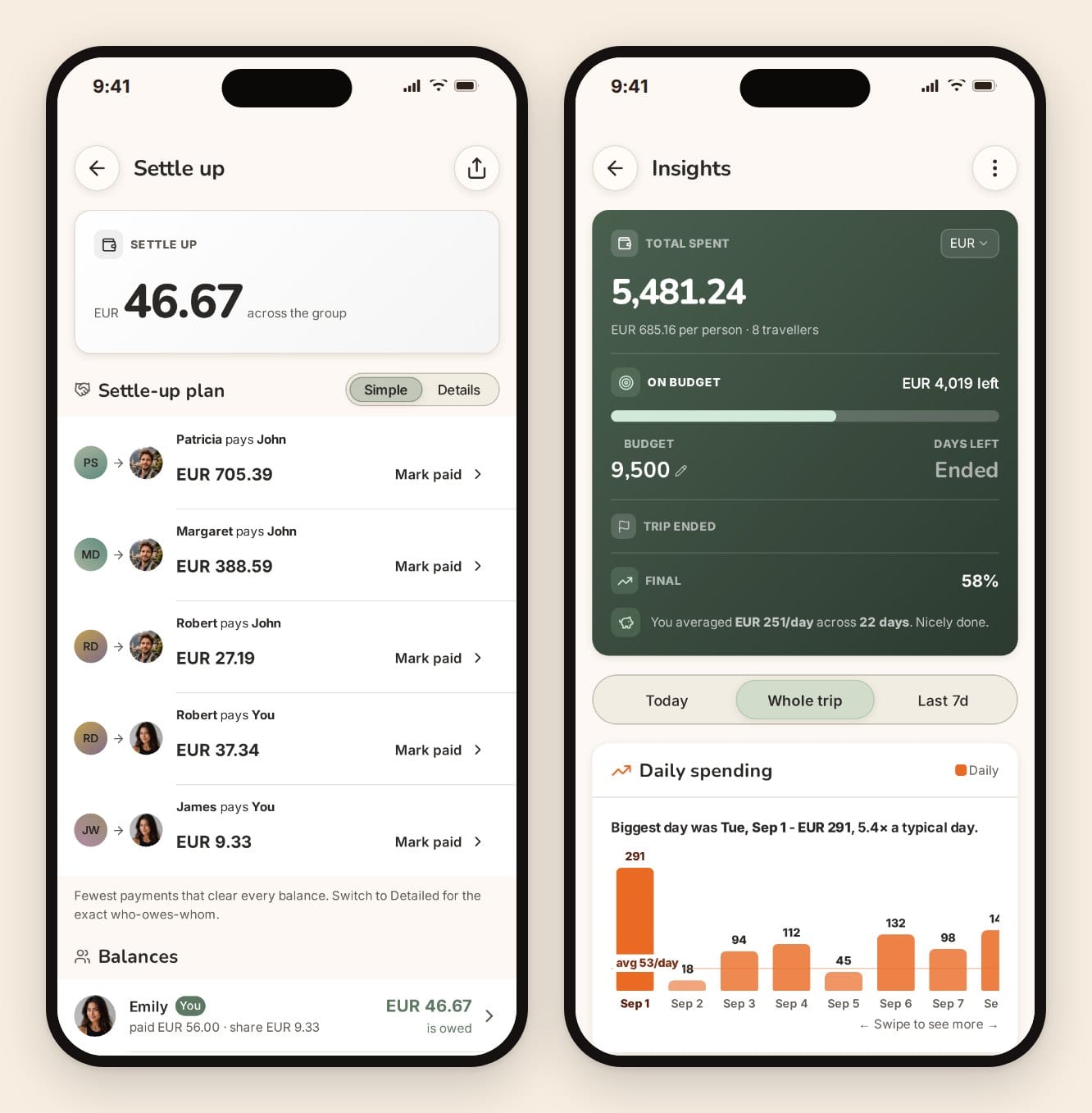
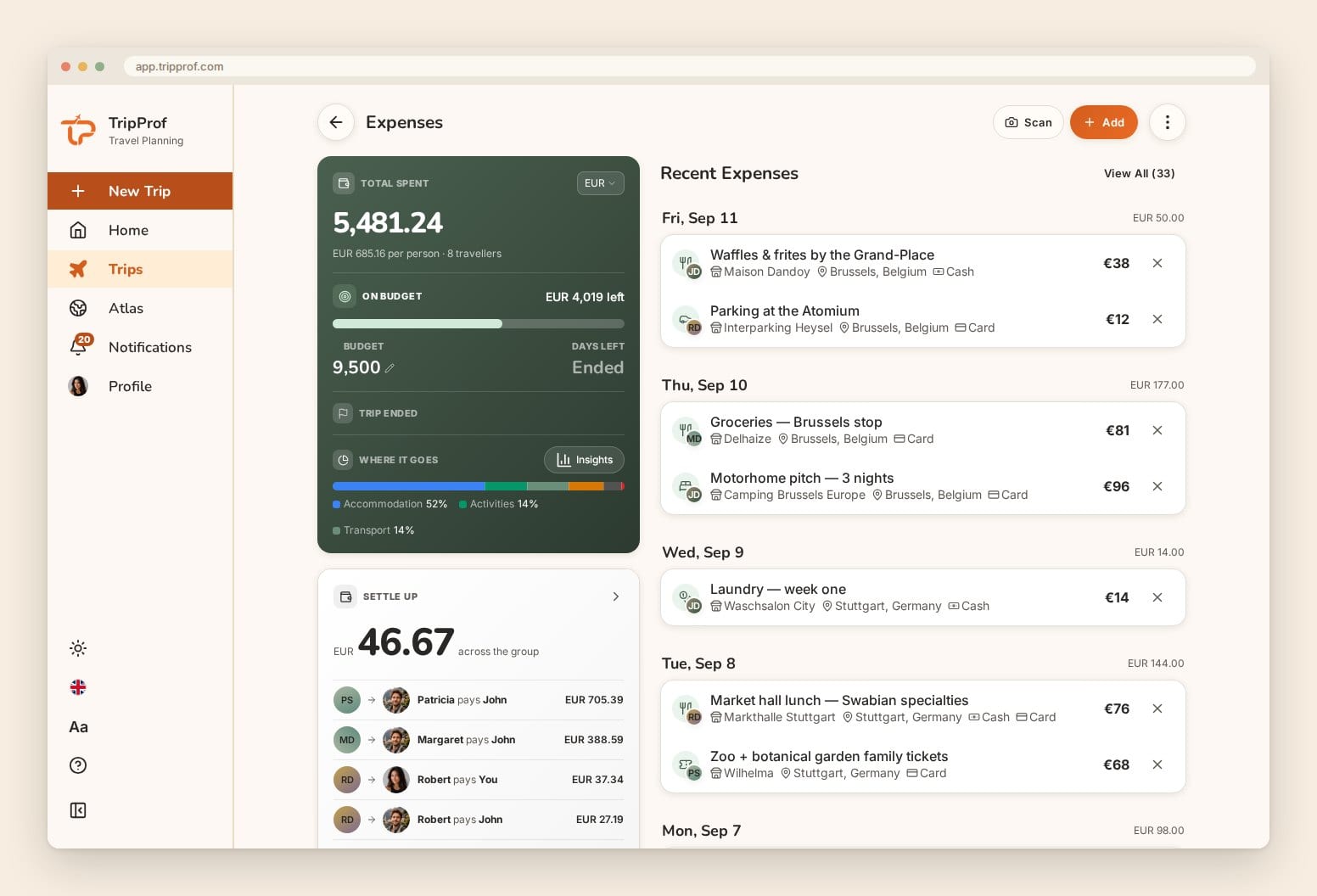
Expenses go further than most planners. Log in any currency, split equally, by exact amounts, by percentage or by shares, record more than one payer, and set a budget. Settle-up turns the balances into a short list of payments (at most one fewer than the number of people). Expense tracking, splitting, settle-up and spending insights are free for the organizer, and the rest of the group sees them once the trip is Pro. Receipt scanning also needs a Pro trip.
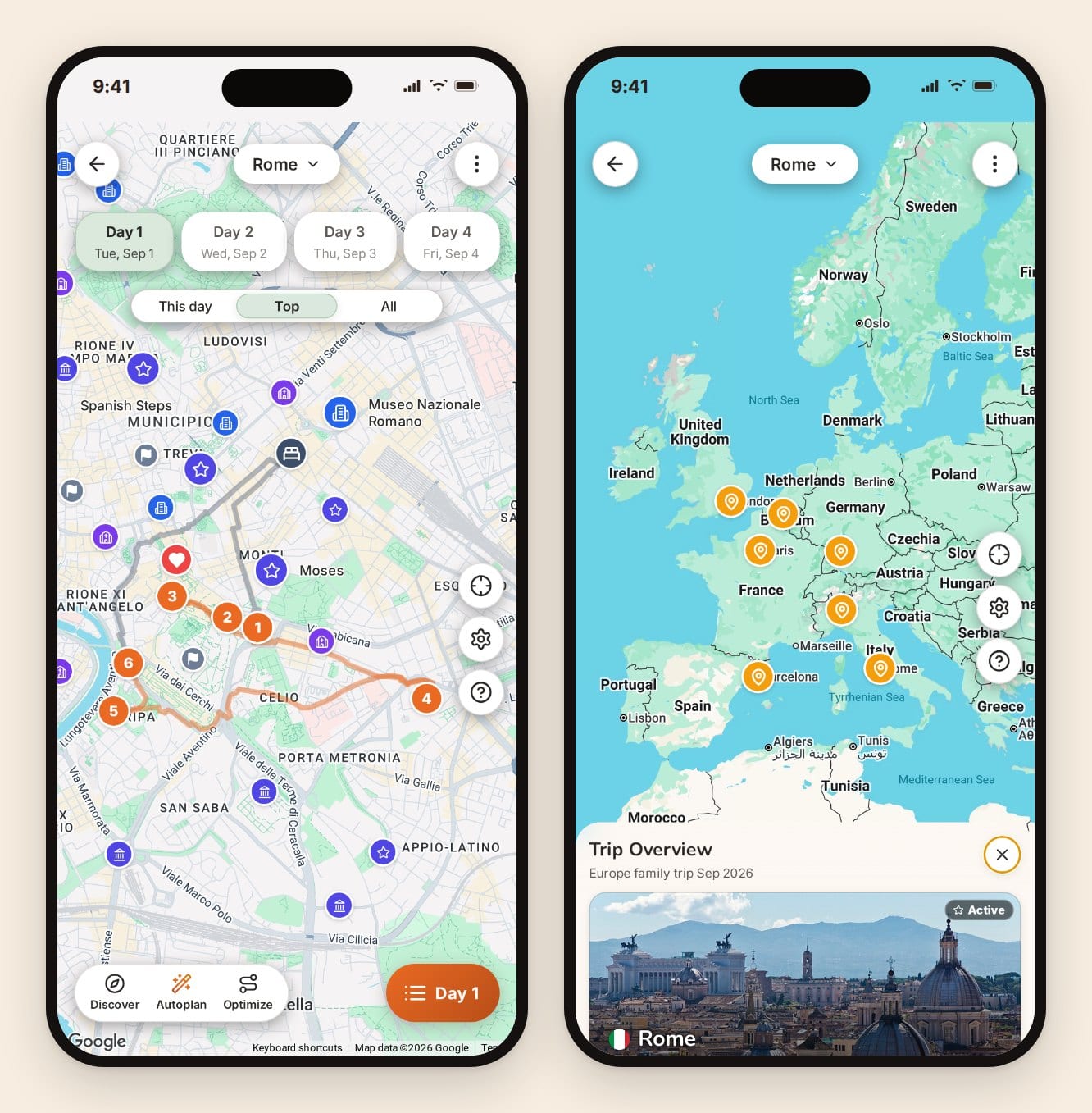
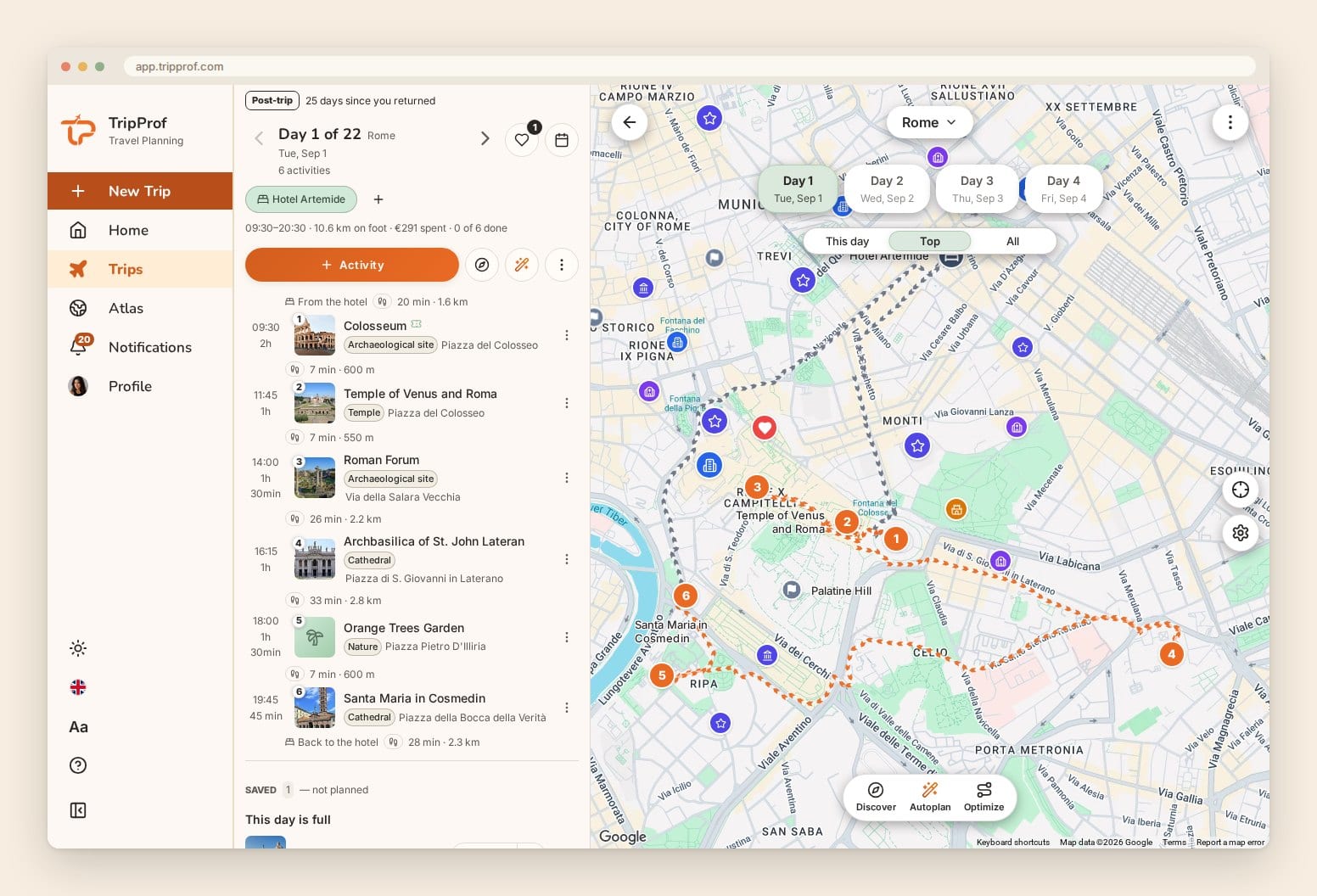
The itinerary is free to build by hand. Each day sits on a map with the route between stops, plus a trip overview that strings every city together. You can add places from each destination's top attractions, export to PDF or a spreadsheet, and subscribe in Google or Apple Calendar. On a Pro trip, Autoplan fills a day, a city or the whole trip around your fixed bookings, plans your saved places first, and keeps the walking between stops short. It never removes anything you added yourself.
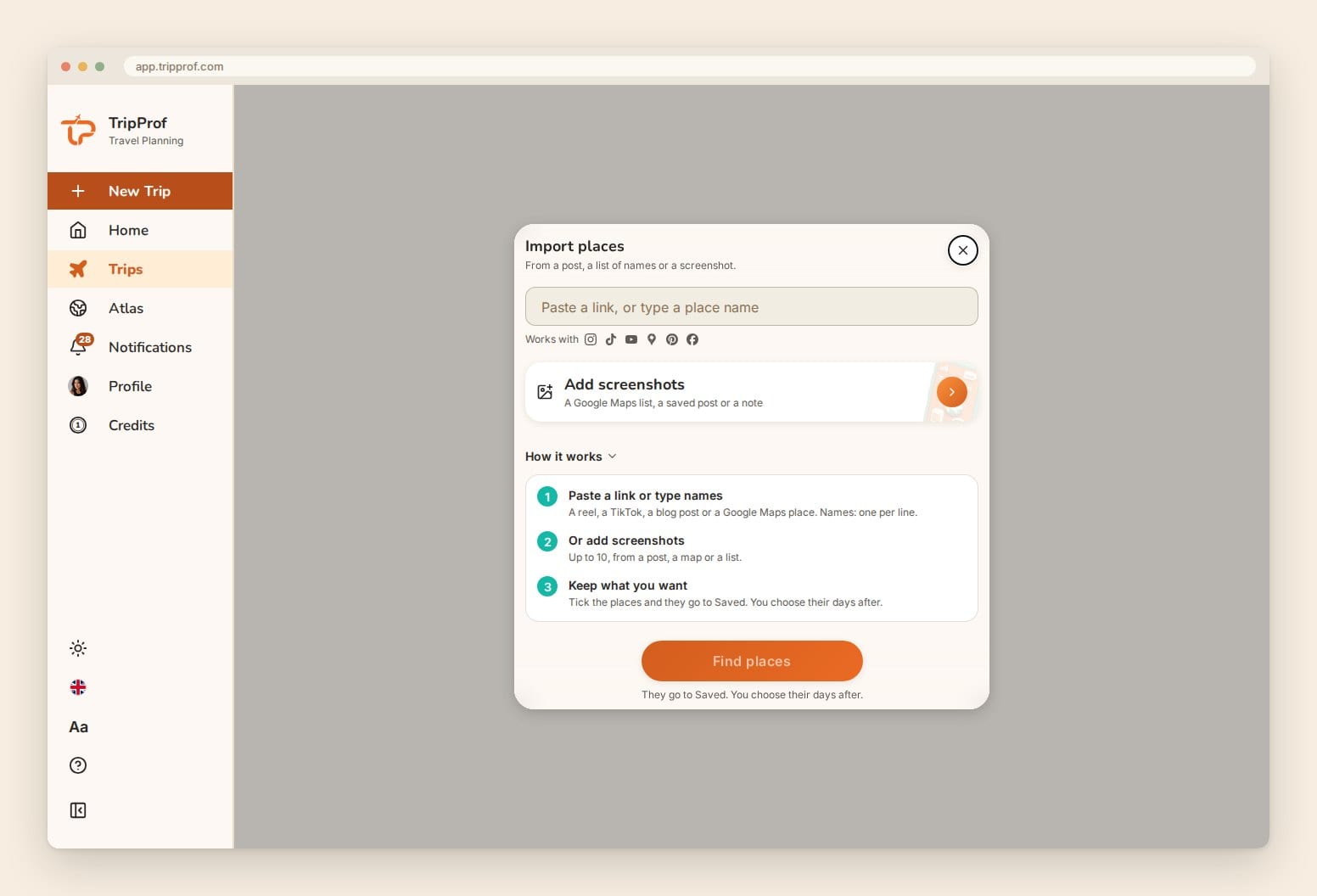
Places come in from wherever you found them. On a Pro trip, Import places reads a link to a reel, a TikTok, a blog post or a Google Maps place, names pasted one per line, or up to 10 screenshots. On a phone you can share a post straight to TripProf from Instagram or TikTok. You tick the places you want and they land in the trip's Saved list. A Google Maps list can't be read from its link, so a screenshot of it is the way in. Wanderlog and Rhyme import from links too; the difference here is that the places land in the same trip as the money and the bookings.
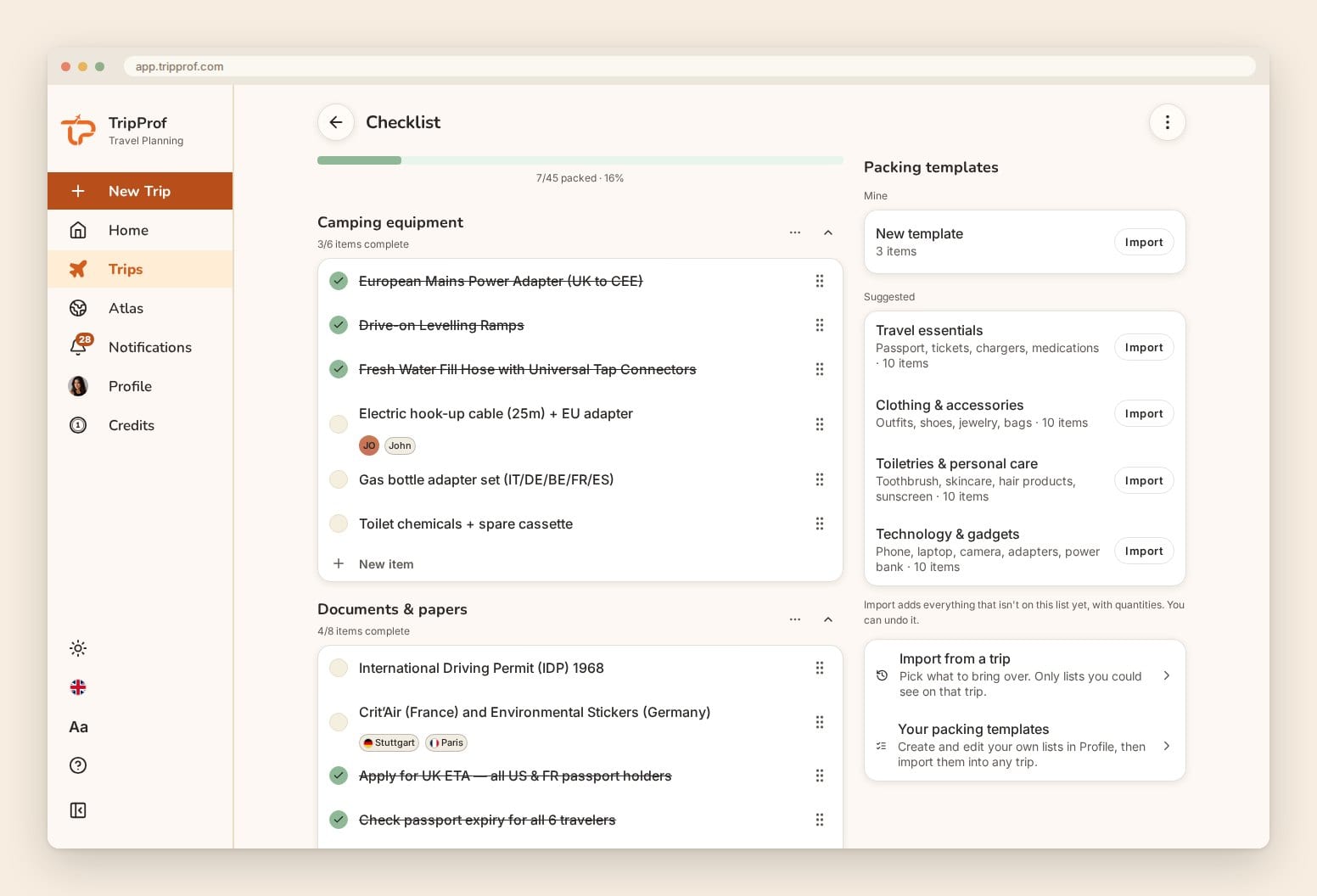
The packing list says who brings what. Everyone sees one Shared list and keeps a private My list. Any shared item can name who packs it, how many, and at which stops it's needed, and you can save your own templates or pull a list from a past trip.
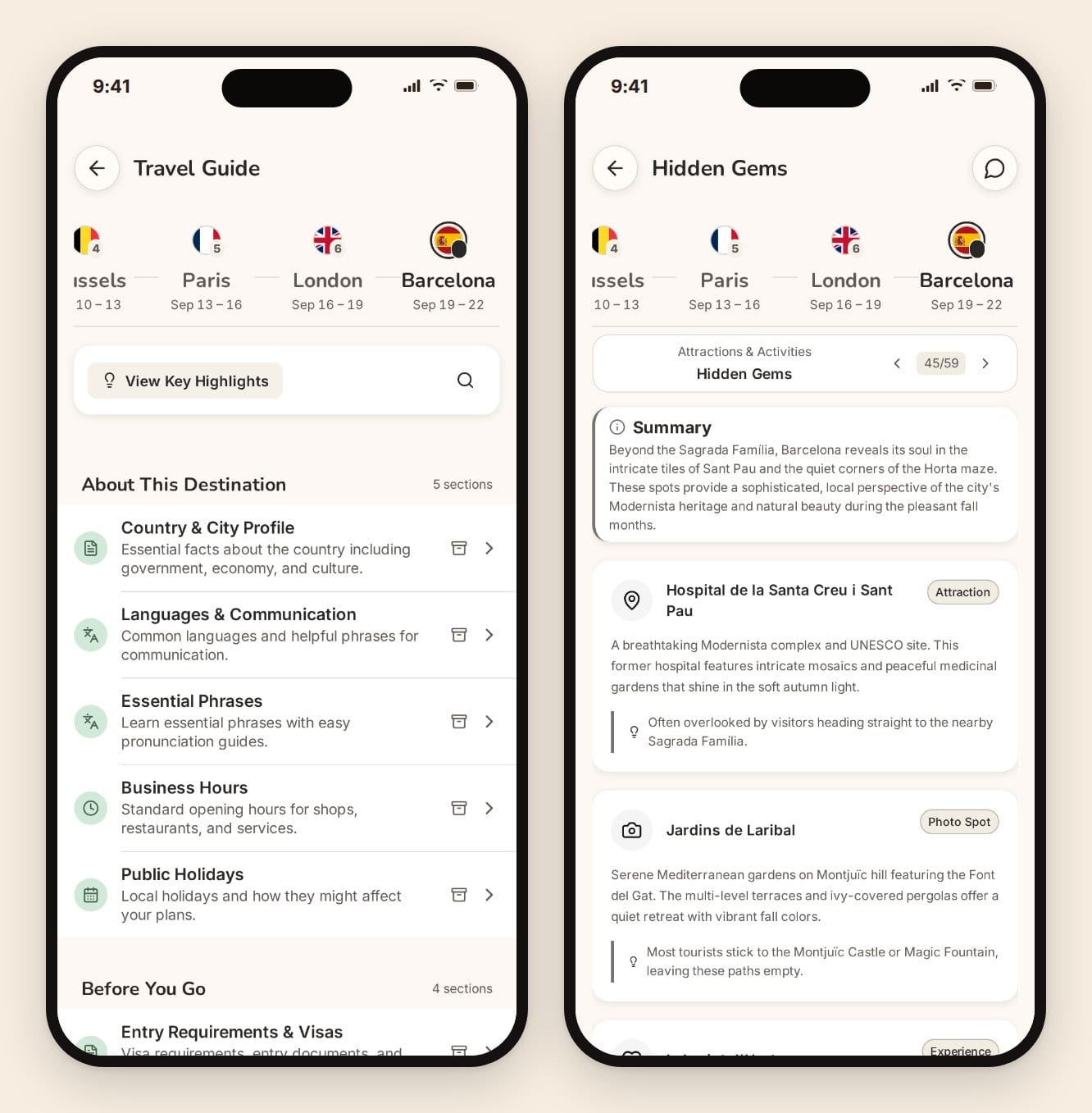
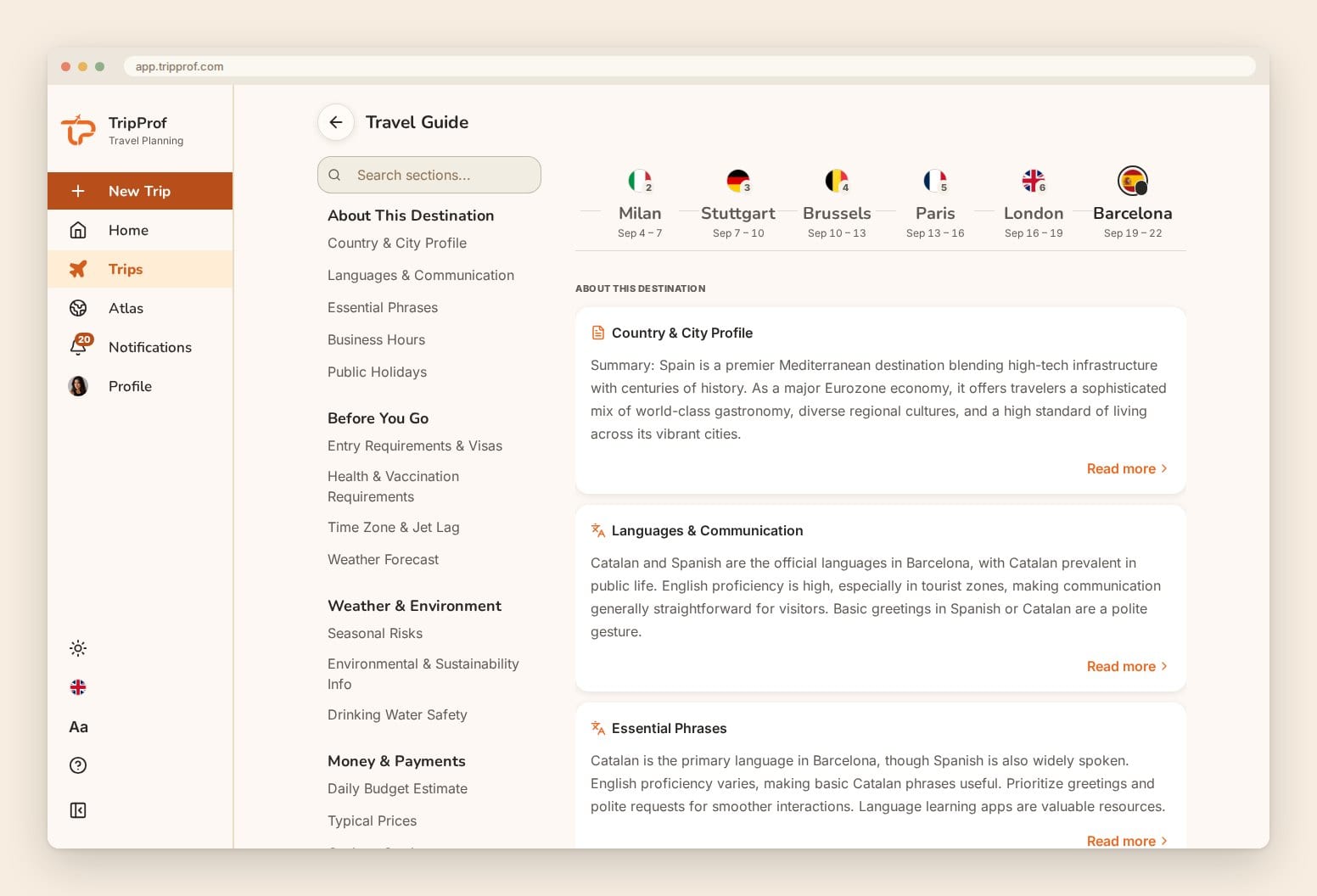
The guides are personalized. Each destination gets up to 59 structured sections across 13 categories, written for your diet, health needs, budget and travel style. 13 sections are free for every trip. The rest unlock on a Pro trip.
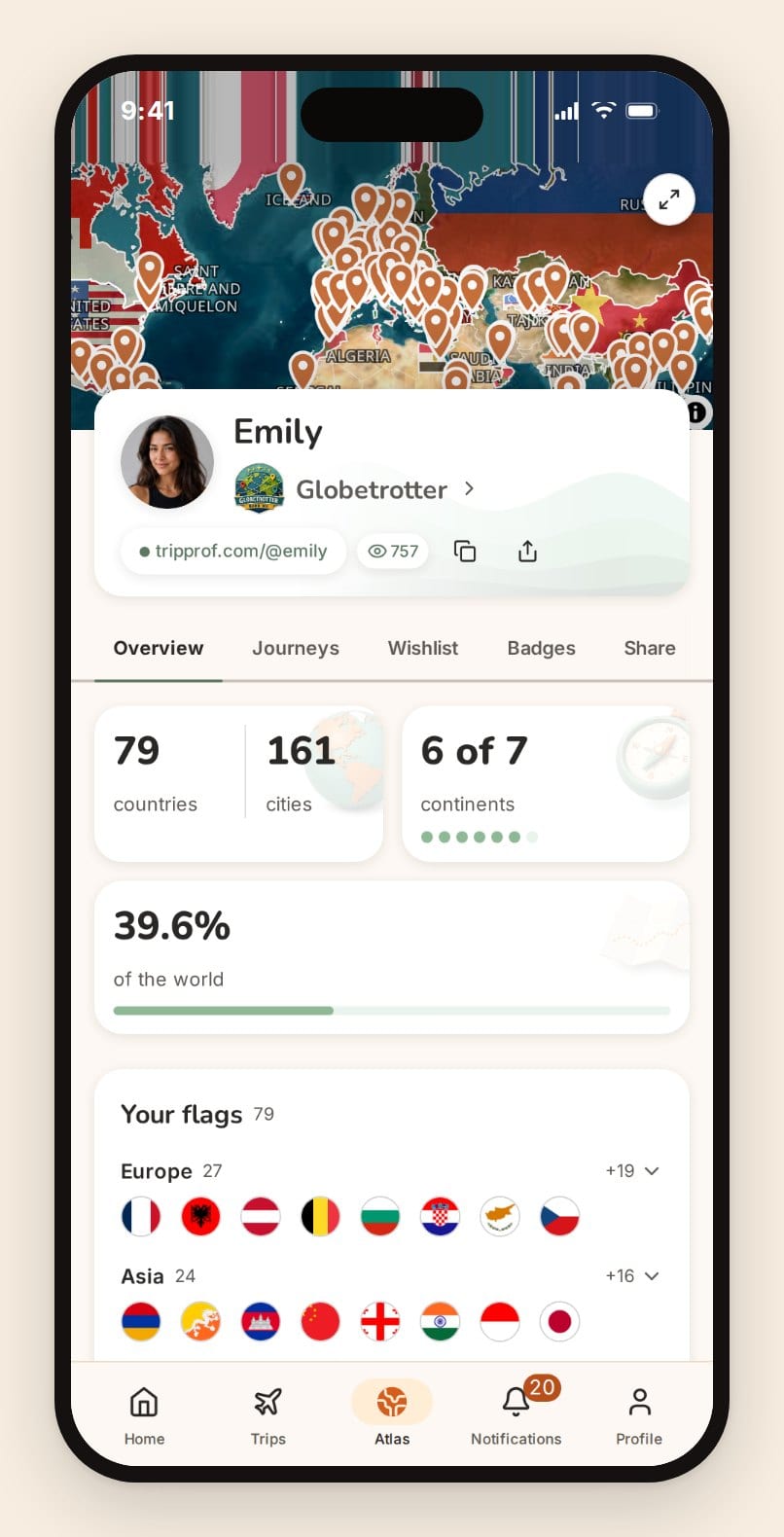
Atlas is free and keeps going after the trip. Every trip paints its countries into your world map, with cities, continents, flags, badges, a logbook, journeys, and an optional link-only public page. Most planners file a finished trip away. This one adds it to your travel history.
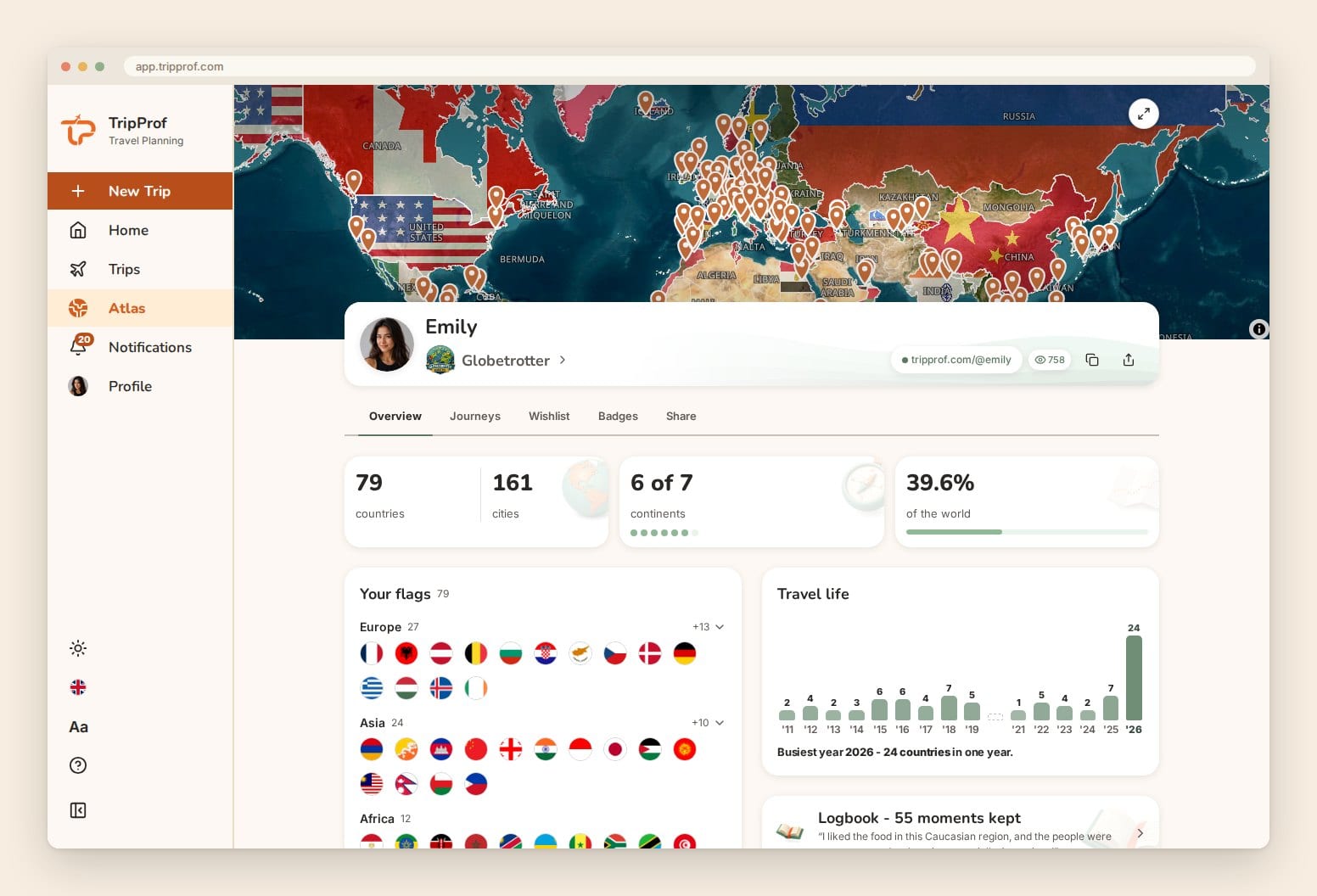
Accessibility is free too: light and dark themes, three text sizes, and an interface translated into every language the app ships. There are no ads and no data selling.
Where TripProf falls short.
- Sharing the full trip costs one credit. Invitees get the dashboard, travelers list and Trip board free. The shared itinerary, expenses and documents, plus the trip inbox, offline mode, scanning, Import places and Autoplan, unlock when the organizer spends one $3.99 credit, once, for the whole group.
- Offline covers your trip's details, not the document files themselves, and booking files are deleted seven days after a trip ends (the details stay). Keep your own copies of tickets.
- It's new (built in 2025), so it has almost no store reviews yet: one US App Store rating as of October 2026, against about 36,000 for Wanderlog. Try it free on one trip before you bring the group.
Platforms: iOS, Android, web, tablet. Pricing on the web (as of October 2026; store prices vary by country): free with no card. One credit ($3.99) makes a trip Pro for the whole group. Packs of 3 credits ($9.99) and 5 ($13.99) never expire. The Pro subscription is $7.99/month for 3 credits or $54.99/year for 36, and those credits expire at the end of each billing period. For the full tour with more screenshots, see our TripProf group trip walkthrough, or start a trip free and invite one person to see how it works.
Wanderlog
Wanderlog is the most popular planner in this category by store ratings, and it earns it. Drag places onto a map, sort them into days, and edit together in real time "like Google Docs", as its US App Store listing puts it. It has caught up on money too: the listing now promises you can "split a bill with other people" and "settle debts between tripmates". It imports reservations from forwarded emails (connecting Gmail is a Pro feature), and checklists sit inside the trip plan.
New in 2026: a Trip Journal (by April) and "Import from anywhere" (September), which turns a pasted link or a shared reel into an itinerary.
Where it falls short: destination content is web guides and other users' trips, not guides written for you. We couldn't find a document folder or group polls on its official listings. Offline is confusing: the Play listing says "Access your trip plans offline (Pro)", while the iOS listing says plans are stored offline with no tier mentioned. And its listings don't say whether one Pro plan covers your tripmates.
Platforms: iOS, Android, Web. Pricing: free tier. The US App Store lists Pro annual plans from $31.99 to $59.99 and monthly plans at $5.99 and $16.99 (October 2026). Ratings: 4.9 iOS (35,930 US ratings), 4.7 Android
Lambus
Built in Osnabrück, Germany, Lambus covers a lot of ground: itinerary, expense splitting, document copies, shared packing lists, GPX imports for road trips, and real-time planning with a group chat. It is now part of Tourlane, as the Lambus site footer states.
Pricing is the most flexible here: monthly, yearly, pay-per-trip or lifetime. Lambus says "you and your fellow travelers get access to advanced features", which suggests a paid trip covers the group, though the wording leaves room. The weak points are offline (a Pro feature), community-curated rather than personalized guides, and six interface languages.
Platforms: iOS, Android, Web. Pricing (US App Store, October 2026): $24.99/year, $8.99 per trip, $3.99/month or $89.99 lifetime (€24.99 and €9.99 in Germany). Ratings: 4.7 iOS (81 US ratings), 4.4 Android
Stippl
Stippl is the social-first entry, Amsterdam-based and on the App Store since December 2022. It now calls itself a free AI travel planner. Expense splitting and settle-up are free, and it stores boarding passes and vouchers. It sells eSIM data plans for "190+ countries, right in the app". Offline access is listed, and forwarding booking emails into the trip and unlimited AI trip generation are Pro.
The Android rating (3.7) trails iOS by a wide margin, and the AI-first pitch leans on generated plans, though the full planner is free to use by hand.
Platforms: iOS, Android, Web. Pricing: free; Pro "starts from €4.99 per month", varying by country. Ratings: 4.6 iOS, 3.7 Android
Itinerary organizers: for people who just want their bookings in order
Not everyone needs a full planning suite. Some people book flights, hotels and tours separately and just want one timeline. That's what these three do.
TripIt
Forward a confirmation to plans@tripit.com and it becomes a timeline entry. TripIt has done this since 2006, and 2026 is its 20th year. Offline access is free. Pro adds real-time flight alerts, seat tracking, country information, and since March 2026, importing bookings from a photo or PDF.

www.tripit.com · 2026-10-17
But TripIt stays in its lane. There's no expense tracking, no checklists, and sharing shows your plans to others rather than letting them plan with you. At $49/year it makes sense if you fly monthly. TripIt belongs to SAP Concur, which explains the business-traveler focus.
Platforms: iOS, Android, Web. Pricing: free; Pro $49/year. Ratings: 4.8 iOS (312,089 US ratings), 4.7 Android
Tripsy
If everyone in your group has an iPhone, Tripsy is the most polished option on this list. It was a 2024 App Store Award finalist, supports 32 languages, and runs on iPhone, iPad, Mac and Apple Watch. Guests are free, it tracks expenses in multiple currencies, and its September 2026 update added Smart Import and suggested costs from attached emails.
Android is the catch. Tripsy's own Android page says "There's no native Android app yet", only a browser view. If one friend uses Android, pick something else.
Platforms: iPhone, iPad, Mac, Apple Watch. Pricing: $59/year or $299 lifetime on its site. The App Store lists lower annual prices. Ratings: 4.7 iOS
Tripomatic (formerly Sygic Travel)
Tripomatic rebranded from Sygic Travel in late 2024 and shipped Tripomatic 26 in February 2026, adding an AI assistant, a trip shortlist and wider routing. It's strong on maps and real-time co-planning, and it tracks the cost of activities per traveler.
tripomatic.com · 2026-10-17
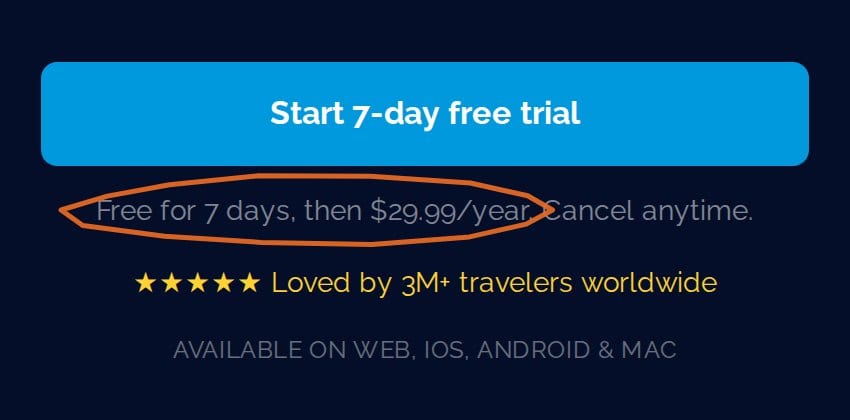
The free plan is tight: up to five planned days per calendar month, 25 places per trip, and ads. Premium unlocks offline maps and exports. There's no expense splitting, document storage or packing list.
Platforms: iOS, Android, Web. Pricing: free; Premium $29.99/year after a 7-day trial. Ratings: 4.6 iOS, 4.2 Android
The AI trip planner wave: impressive demos, limited utility
Since 2023, a wave of startups has raised money to generate itineraries from a prompt. The demos look great. Then the trip starts, and none of them can tell you who paid for dinner. Our piece on why AI struggles with trip planning covers the accuracy problems. Here's how they work as apps.
Layla AI
Layla plans trips by chat, with live prices and booking links. The big news: Layla is now part of Expedia Group, announced in July 2026. Expect it to steer you toward Expedia inventory over time.
There's no expense tracking, no checklists and no document storage. It's a research and booking tool, not a trip management tool.
Platforms: iOS, Android, Web. Pricing: free; Layla Premium $49.99/year or $9.99/month. Ratings: 4.7 iOS, 4.7 Android
Mindtrip
Mindtrip is free. Its investors include Amex Ventures, Capital One Ventures and United Airlines Ventures, and it bought the guide platform Thatch in 2025. Group chats and shared itineraries make it more social than most AI planners.
But there's no official Android app (a similarly named Play Store app comes from a different developer) and no expense tracking. Offline access was added in 2026.
Platforms: iOS, Web. Pricing: free. Ratings: 4.7 iOS
iplan.ai
iplan.ai generates minute-by-minute itineraries from your dates, interests and budget, with offline access and basic sharing. The worry is maintenance. Its last iOS update shipped in November 2025, a year ago.
Platforms: iOS, Android, Web. Pricing: free; Pro at $3.99 and $9.99 in the US App Store. Ratings: 4.5 iOS, 3.9 Android
Wanderboat AI
Wanderboat has repositioned as "Wanderboat: Local Guide", an AI local insider for dining and nightlife that also builds quick itineraries. It now has iOS and Android apps. Useful for "where should we eat tonight", thin on everything a trip needs after that.
Platforms: iOS, Android, Web. Pricing: free. Ratings: 4.6 iOS, 4.1 Android
Every AI planner here is good at producing an itinerary and weak at running a trip. None of them tracks shared expenses, stores your bookings or settles the bill. Use them for ideas, then move the plan somewhere your group can actually use.
Expense trackers: if all you need is to split the bill
If you've ever stood at a restaurant table in Rome working out who owes what in three currencies, you know why splitting tools exist. These apps solve that one problem very well.
Splitwise
Splitwise is the default for shared bills, with more than 10 million Google Play downloads and a debt-simplifying algorithm. But the free tier now has a daily expense limit, and Splitwise doesn't publish the number. Pro removes it and adds receipt scanning, currency conversion and charts, at a price that "may vary" by country and date.
It does nothing beyond money. No itinerary, no guides, no checklists. Its US App Store rating is 4.0.
Platforms: iOS, Android, Web. Pricing: free with a daily limit; Pro varies by country. Ratings: 4.0 iOS (28,879 US ratings), 4.0 Android
Tricount
Tricount, owned by the European bank bunq, is free with no expense limits. The old Premium tier was discontinued, along with its export and statistics features. It works offline, converts currencies at no charge, and can link a free bunq card. One oddity: the site says "No ads" while its Google Play listing says "Contains ads".
We'd pick Tricount over Splitwise for any group that doesn't want a subscription. Like Splitwise, though, it's money only.
Platforms: iOS, Android, Web. Pricing: free. Ratings: 4.9 iOS, 4.8 Android
TravelSpend
TravelSpend is built for budgeting, not just splitting. Set a daily or total budget, log spending in local currency, and track it against the target, offline if needed. It also tracks who owes whom. There's no web app, so setup happens on your phone.
Platforms: iOS, Android. Pricing: free with unlimited expenses; Premium and a $59.99 lifetime option in-app. Ratings: 4.8 iOS, 4.8 Android
Single-purpose stars: apps that do one thing brilliantly
Sometimes the best tool does exactly one thing. These won't replace your planner, but one of them might earn a permanent spot on your phone.
Flighty (flight tracking)
Pure flight tracking. Flighty won a 2023 Apple Design Award, and its App Store listing claims delay alerts "2-90 minutes faster than airline apps". Pro costs $59.99/year. It's Apple-only, and its Android page says there are no "immediate plans" for a version.
Fly monthly? It's worth it. Fly twice a year? Skip it.
Platforms: iOS. Pricing: free; Pro $59.99/year. Ratings: 4.8 iOS
PackPoint (packing lists)
Tell PackPoint where you're going, when, and what you'll do, and it builds a packing list from the weather forecast. It has been around since 2014 and its site says over two million lists get made each year. Premium is a one-time $2.99. For more on packing, see our packing hacks that actually work.
The downside is that your list lives in yet another app, away from the trip it's for.
Platforms: iOS, Android. Pricing: free; $2.99 one-time. Ratings: 4.7 iOS, 4.4 Android
Roadtrippers (road trips)
Roadtrippers says it's "powered by 42 million real trips" on its homepage (its About page still says 38 million). Curated stops, RV routing and offline maps make it the obvious pick for North American road trips. Paid plans run from $35.99/year (Basic) to $59.99/year (Premium, 150 stops per trip).
Its Android rating is 2.6, so read the recent reviews before you pay.
Platforms: iOS, Android, Web. Pricing: $35.99-$59.99/year. Ratings: 4.6 iOS, 2.6 Android
Travel trackers and journals: for remembering after the trip
Planning is half of travel. Remembering it is the other half. These apps grew up around tracking your route and turning it into a story.
Polarsteps
Polarsteps tracks your route by GPS, lets you add photos and notes, and lets family follow along. Its homepage invites you to "join the 23M+ travelers". The free AI planner (2025) uses Claude as one input, and the June 2026 release brought trip planning to the web, in-app flight lookup and new location privacy settings.
www.polarsteps.com · 2026-10-17
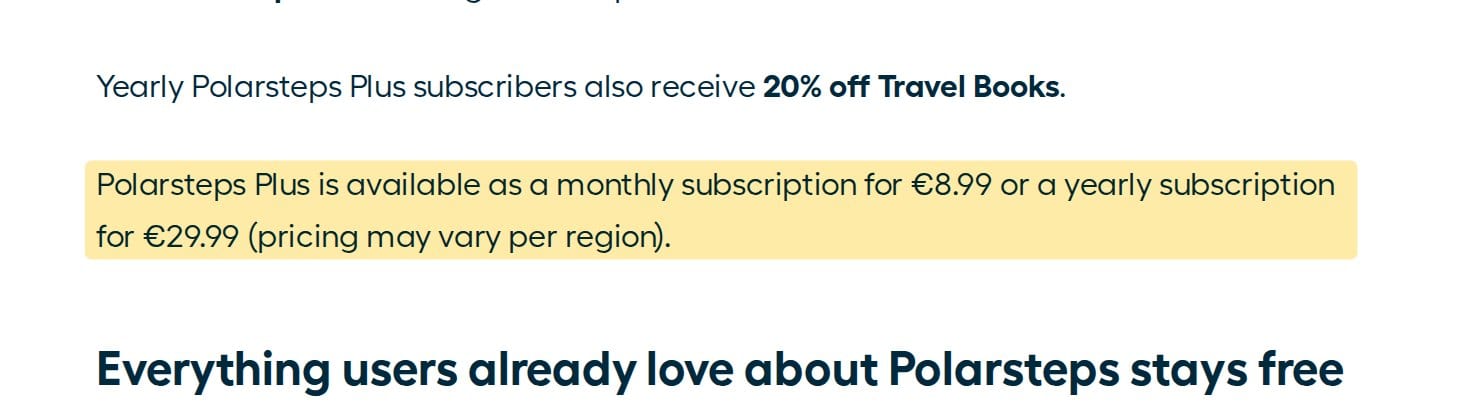
It's no longer entirely free. Polarsteps Plus launched in July 2026 with 3D maps, more Travel Buddies and travel book discounts. The core app stays free and ad-free. What's missing: expense tracking, splitting, packing lists and document storage.
Platforms: iOS, Android, Web. Pricing: free; Plus €8.99/month or €29.99/year. Ratings: 4.9 iOS, 4.7 Android
FindPenguins
FindPenguins works like Polarsteps: GPS tracking, a photo journal, free flyover videos and shared journals. It says it's "entirely free", and you can upload tickets and reservations. It's smaller than Polarsteps, with less polish.
Platforms: iOS, Android, Web. Pricing: free. Ratings: 4.8 iOS, 4.5 Android
The "use what you already have" options
Before installing anything, look at what's already on your phone.
Google killed its Trips app in 2019 and travel.google.com now goes straight to Google Flights. The planning moved into search instead: Canvas in AI Mode builds travel plans for everyone in the US, and Ask Maps suggests itineraries. Great for research. There's still nothing for shared money, bookings or checklists.
Notion
Notion's template gallery lists 1,601 travel templates, 1,019 of them trip planners. You can build anything, which is the problem: you have to build it. No booking import, no currency conversion, and the Plus plan is $120 per member per year, so a group pays several times over.
Rhyme (formerly Roamy)
A new kind of app turns saved TikTok and Instagram videos into trip plans. Rhyme, renamed from Roamy, has been on the App Store since October 2025 and added shared trips in 2026. It's iPhone-only for now, with Pro at $59.99/year. Fun for inspiration, thin on running the trip.
The big comparison: 20 apps, 8 features, no sugarcoating
This is the table you came for. Every app is checked against the eight features, using its own website and store listings as of October 2026. "Yes" means the feature is clearly offered, not merely possible with workarounds. Where an app's own pages disagree, we say so in its section above.
| App | Itinerary | Expenses | Guides | Checklists | Documents | Offline | Collab | Maps | Platforms | Paid tier (Oct 2026) |
|---|---|---|---|---|---|---|---|---|---|---|
| TripProf | Yes (Autoplan on Pro) | Yes, 4 split types + settle-up | 59 personalized sections (13 free) | Yes (smart on Pro) | Yes + trip inbox (Pro) | Pro trip | Roles + Trip board polls | Yes + routes | iOS, Android, Web | $3.99/trip for the group, or $54.99/yr |
| Wanderlog | Yes | Yes + splitting | Web + community | Yes | Not listed | Unclear (see above) | Yes, real-time | Yes | iOS, Android, Web | From $31.99/yr |
| Lambus | Yes | Yes + splitting | Community | Yes | Yes | Pro | Yes, real-time + chat | Yes | iOS, Android, Web | $24.99/yr or $8.99/trip |
| Stippl | Yes (AI) | Yes + splitting | Discover feed | Yes | Yes | Yes | Yes | Yes | iOS, Android, Web | From €4.99/mo |
| TripIt | Yes (email import) | No | Pro country info | No | Yes | Yes (free) | Sharing (Inner Circle on Pro) | Yes | iOS, Android, Web | $49/yr |
| Tripsy | Yes | Tracking, no split listed | No | No | Yes | Yes | Yes, permissions | Yes | Apple only | $59/yr or $299 lifetime |
| Tripomatic | Yes | Cost tracking | Place database | No | No | Premium | Yes, real-time | Yes | iOS, Android, Web | $29.99/yr |
| Layla AI | Chat-generated | No | AI | No | No | Not listed | No | Not listed | iOS, Android, Web | $49.99/yr |
| Mindtrip | AI-generated | No | Local + expert | No | No | Yes | Group chats | Yes | iOS, Web | Free |
| iplan.ai | AI-generated | No | AI | No | No | Yes | Basic | Yes | iOS, Android, Web | $3.99-$9.99 |
| Wanderboat AI | AI-generated | No | Local AI | No | No | No | No | Yes | iOS, Android, Web | Free |
| Splitwise | No | Yes + splitting | No | No | No | Yes | Yes | No | iOS, Android, Web | Varies by country |
| Tricount | No | Yes + splitting | No | No | No | Yes | Yes | No | iOS, Android, Web | Free |
| TravelSpend | No | Budget + who owes whom | No | No | No | Yes | Yes | No | iOS, Android | Premium in-app |
| Polarsteps | Yes (AI planner) | No | AI tips | No | No | Yes | Travel Buddies | Yes | iOS, Android, Web | Plus €29.99/yr |
| FindPenguins | No | No | No | No | Uploads | Yes | Shared journals | Yes | iOS, Android, Web | Free |
| Flighty | Flights only | No | No | No | No | Not listed | No | Flight map | iOS only | $59.99/yr |
| PackPoint | No | No | No | Yes (weather-based) | No | Not listed | Share (Premium) | No | iOS, Android | $2.99 one-time |
| Roadtrippers | Road trips | No | Curated stops | No | No | Paid tiers | Paid tiers | Yes | iOS, Android, Web | $35.99-$59.99/yr |
| Notion | DIY | DIY | No | DIY | DIY | Limited | Yes | No | All platforms | $120/member/yr |
The pattern is plain. The specialists own one or two columns each. The AI planners fill the itinerary column and little else. Four apps (TripProf, Wanderlog, Lambus and Stippl) now combine planning with expense splitting. Of those, only TripProf lists personalized destination guides and group polls, and TripProf and Lambus are the only two that sell a single trip (Lambus's $8.99 pass) rather than a per-person subscription.
What these apps actually cost per year
"Free" hides a lot in this category, so here's the paid tier side by side. These are US prices as of October 2026. TripIt, Tripsy, Tripomatic, Flighty, Roadtrippers, Notion and TripProf come from their own pricing pages, the rest from the US App Store. Tripsy's App Store annual price is lower ($39.99).
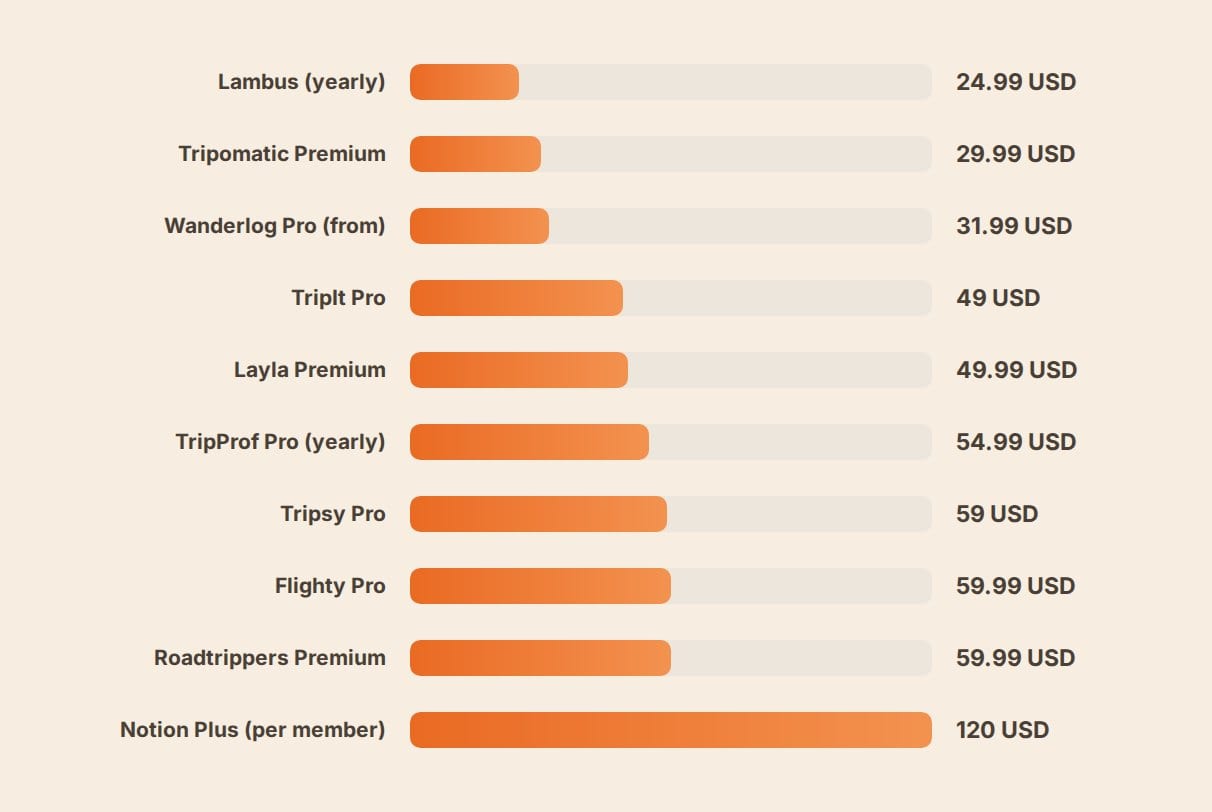
Data: lambus.com, tripomatic.com, apps.apple.com, tripit.com, tripprof.com, tripsy.app, flighty.com, roadtrippers.com, notion.com
The annual price is only half the story. The other half is who has to pay. Layla Premium and Notion are sold per account, and Polarsteps Plus is an individual subscription with no group plan listed, so a group of five that all want the paid features pays five times. Notion's $120 is explicitly per member. Wanderlog's listings don't say either way. TripProf works the other way round: one credit makes a single trip Pro for everyone on it, so a five-person weekend costs $3.99 in total. Lambus's $8.99 trip pass is the closest alternative.
Our take: for one or two group trips a year, a per-trip price beats any subscription. If you travel every month, compare the annual plans, and check whether your travel companions need their own.
Which trip planning app should you actually use?
Most people are better off with one good all-in-one planner than four specialists. Here's who should pick what.
Best app for a group trip with friends or family: TripProf. The organizer spends one credit and the whole group gets the shared itinerary, the expenses with settle-up, the documents and the guides. The Trip board settles "which night for dinner?" with a poll. Whoever holds the bookings forwards them to the trip inbox, and one tap puts each on the right day for everyone.
Best for a solo trip or a first trip abroad: TripProf. The free guide gives every destination its emergency contacts, embassy details, a security brief, cash vs card advice and a phrase sheet, and Atlas keeps the trip on your map afterwards. Pair it with a proper document checklist.
Best free map-first planner: Wanderlog. If you mostly want to drag places onto a map, its free tier gives you unlimited trips and the best map canvas in the category.
Best for a multi-city Europe trip: TripProf. A multi-city route needs a guide per destination, expenses in more than one currency, and the whole route on one map. TripProf does all three, with offline on a Pro trip for when you lose signal between Prague and Vienna.
Best for frequent business travel: TripIt Pro plus Flighty. Email forwarding, flight alerts and seat tracking justify $49/year if you fly monthly. Add Flighty for the fastest delay alerts, if you're on iPhone.
Best for a US road trip: Roadtrippers. Add Tricount if you're splitting fuel.
Best for a free travel journal: Polarsteps. Automatic GPS tracking and printed travel books. Pair it with Tricount for the money, because Polarsteps doesn't do it.
Best if your whole group uses iPhones and you mostly need a timeline: Tripsy.
If you'd rather not commit to one app, the efficient setup is one planner plus one splitter: Wanderlog plus Tricount, or TripIt plus Tricount. That's two installs for every person in the group. An all-in-one that already splits costs (TripProf, Lambus, Stippl, Wanderlog) gets you down to one.
How we compared
We judged every app against the same eight features. Every price, rating and feature claim comes from the app's own website, its official blog or its store listing, fetched in October 2026. Ratings are US App Store and US Google Play figures, so they differ from the worldwide counts some apps quote. Where an app's own pages contradicted each other (Wanderlog on offline, Tricount on ads, Roadtrippers on trip counts), we reported both. TripProf's details were checked against the app itself, and its screenshots are real captures of a demo trip. We didn't count features that were only mentioned in user reviews.
Features and prices in this category change every few months. If one matters to your decision, check the app's own pricing page before you pay.
Frequently Asked Questions
What is the best trip planning app in 2026?
For a group trip, TripProf: it covers all eight core features, with guides written for your trip, and one credit unlocks the trip for every member. For a solo trip or a first trip abroad, TripProf, because its free guide covers emergency contacts, embassies, safety and cash vs card for every destination. For a free map-first planner, Wanderlog. For frequent flyers who just want their bookings in order, TripIt Pro.
What are the best apps like Wanderlog?
TripProf, Lambus and Stippl are the closest alternatives, since all three combine itinerary planning with expense splitting, and all three run on the web too. TripProf adds personalized destination guides, a booking inbox per trip and group polls. Lambus offers a pay-per-trip option and real-time chat. Tripomatic is the pick if map layers and offline maps matter most.
How much does Wanderlog Pro cost?
As of October 2026, the US App Store lists Wanderlog Pro annual plans from $31.99 a year (up to $59.99), plus monthly plans at $5.99 and $16.99. Wanderlog's own pricing page didn't show a price when we checked, so confirm in the app.
What is the best trip management app for a group?
TripProf. It keeps the itinerary, expenses and settle-up, bookings, checklists and guides in one shared trip, with organizer, editor and viewer roles and an activity log for money changes. The Trip board handles group decisions with polls.
Which trip planning app lets the group vote?
TripProf's Trip board has polls with a visible tally, free for everyone on the trip. We found no polls on the official listings of Wanderlog, Lambus, Stippl or Mindtrip.
Which app turns a forwarded booking into an itinerary item?
TripIt, Tripsy and Wanderlog import forwarded confirmations into the timeline. TripProf gives each Pro trip its own forwarding address, recognises nine booking types, and puts flights, trains, tours, events and restaurant bookings on the right day by itself. Hotels and car rentals take one tap. It also opens the matching expense pre-filled, which TripIt doesn't do because it has no expense tracking.
Are AI trip planners good enough to use on their own?
For ideas, yes. For the trip itself, no. Layla, Mindtrip, iplan.ai and Wanderboat produce a starting itinerary, but none tracks shared expenses, stores bookings or settles up. Use them for research, then move the plan to a management app.
Which trip planning apps work on both iPhone and Android?
TripProf, Wanderlog, Lambus, Stippl, TripIt, Tripomatic, Layla, iplan.ai, Wanderboat, Splitwise, Tricount, TravelSpend, Polarsteps, FindPenguins, PackPoint and Roadtrippers. Tripsy, Flighty and Rhyme are Apple-only. Mindtrip has no official Android app.
What is the best free app for splitting expenses on a group trip?
Tricount: free, no expense limits, multi-currency. Splitwise's free tier now has a daily expense limit. If you want the splitting inside your trip planner, TripProf, Wanderlog, Lambus and Stippl all include it.
Is there a trip planner that also keeps a map of the countries you have visited?
Yes. TripProf's Atlas is free: every trip paints its countries into your world map, with cities, continents, badges, a logbook and an optional public page. Polarsteps and FindPenguins draw your route, but neither tracks shared expenses.
How much should I expect to pay for a trip planning app?
From nothing to about $60 a year for most apps, and $120 per member for Notion Plus. The bigger question is whether each traveler pays. Per-trip pricing (TripProf from $3.99 for the whole group, Lambus $8.99) is usually cheaper for a couple of group trips a year.
Key takeaways
- Pick by trip type, not by hype. All-in-one planners, itinerary organizers, AI generators, splitters and specialists each solve a different problem.
- For group trips, TripProf covers the most ground. All eight features, guides written for your trip, one credit for the whole group, polls on the Trip board, and a booking inbox per trip. Free to start; one $3.99 credit unlocks the whole trip for the group.
- Wanderlog is the best free map-first planner, and it now splits bills too. Its guides are web and community content, and its listings don't say whether Pro covers the group.
- AI planners make itineraries, not trips. Layla now belongs to Expedia, and none of the AI apps handle shared money or bookings.
- Check who pays, not just how much. A per-account subscription multiplies across a group. A per-trip price doesn't.
- Free tiers are shrinking at the edges. Splitwise added a daily limit and Tripomatic caps free planned days. Polarsteps kept its core free but added a paid Plus tier. Tricount and FindPenguins remain fully free.
Planning a trip right now? Start it in TripProf for free, no card needed. Invite the group and put the first question on the Trip board.
Sources
- CIT Bank / Harris Poll (June 2026): 45% of group travelers have had financial conflict or discomfort on a trip
- Sensor Tower: 2025 State of Mobile Travel Apps: 4.2 billion travel app downloads in 2024
- Wanderlog: features (prices and ratings from its US App Store listing, October 2026)
- Lambus Pro: features and Tourlane ownership
- Stippl: features, Pro pricing, eSIM coverage
- TripIt Pro: $49/year, features
- Tripsy Pro: pricing and plans
- Apple Newsroom: 2024 App Store Award finalists: Tripsy
- Tripomatic Premium: $29.99/year
- Travolution: Expedia Group acquires Layla
- Mindtrip: free
- Splitwise Pro: Pro features
- Tricount: free plan and bunq card
- Flighty pricing: $59.99/year
- Apple Newsroom: 2023 Apple Design Awards: Flighty
- Roadtrippers: plans and trip count
- Polarsteps Plus launch: pricing and features
- Polarsteps summer 2026 release: web planning, privacy settings
- FindPenguins: free model
- Google: Canvas in AI Mode travel planning
- Notion travel templates: template counts
- Rhyme (formerly Roamy)
Last updated: November 5, 2026
Keep Reading
More travel tips and guides picked for you

1 in 6 AI trip planners got sent to a place that doesn't exist, survey finds
A new survey found 1 in 6 AI trip planners got sent to a place that doesn't exist, and 55% hit at least one wrong recommendation. Here's the checklist to run before you book anything AI suggests.

Should You Let AI Book Your Trip? What ChatGPT and Gemini Actually Do in 2026
OpenAI pulled ChatGPT's travel checkout button, Google is testing AI-booked hotels, and one study caught chatbots pushing pricier sponsored flights. Here's the real 2026 verdict on letting AI handle the purchase.

Travel Blogging Myths 2026: 7 Debunked With Real Data
Most new travel bloggers earn $4.44 a month. AI search cut median blog traffic 85%. Here's what 2026 income surveys, traffic data, and real blogger accounts say about the myths still circulating.